TGX 1.1.1
A tiny 2D/3D graphics library optimized for 32 bits microcontrollers.
Loading...
Searching...
No Matches
Basic concepts.

The TGX library's main class is the tgx::Image class which, as its name suggests, encapsulates an image, that is a rectangular array of pixels of a given color type. The library provides an extensive set of 2D and 3D drawing procedures that operate on image objects.

All methods/classes are defined inside the tgx namespace. To use the library, just include tgx.h:

#include <tgx.h>
using namespace tgx; // optional, so we do not need to prefix all methods by tgx::
Main header file.

A minimal TGX framebuffer is just a pixel buffer plus an Image view over it:

tgx::RGB565 buffer[320 * 240];
tgx::Image<tgx::RGB565> im(buffer, 320, 240);
im.clear(tgx::RGB565_Black);
im.drawLine({0, 0}, {319, 239}, tgx::RGB565_Red);
const RGB565 RGB565_Red
Color red in RGB565 format.
Image class [MAIN CLASS FOR THE 2D API].
Definition: Image.h:145
Color in R5/G6/B5 format.
Definition: Color.h:216

Color types

The library defines several color classes. Choosing the right one is mostly a question of memory, speed and intended use:

Type Layout Storage/alignment Typical use
tgx::RGB565 16-bit RGB: 5 bits red, 6 bits green, 5 bits blue Aligned as and convertible to uint16_t Preferred type on MCU displays: compact, fast, and compatible with many embedded display drivers.
tgx::RGB24 24-bit RGB: 8 bits red, 8 bits green, 8 bits blue No special alignment Useful on CPU or when a simple 24-bit image format is convenient and no alpha channel is needed.
tgx::RGB32 32-bit RGBA: 8 bits per channel, pre-multiplied alpha Aligned as and convertible to uint32_t Useful when an alpha channel is needed, especially for pre-multiplied alpha blending.
tgx::RGBf 96-bit RGB: 32-bit float per channel Aligned as float, no alpha channel Used for floating-point color computations, especially with the 3D API lighting/material code.
tgx::RGB64 64-bit RGBA: 16 bits per channel, pre-multiplied alpha Aligned as and convertible to uint64_t Use only when high precision and alpha are both needed; heavier than the usual MCU formats.
tgx::HSV 96-bit HSV: 16 bits Hue, 16 bits Saturation, 16 bits Value Partial support only Mainly an intermediate color space for conversions or procedural color generation; slow for drawing operations.

Color types are handled just like usual basic types such as int or char. Any color type can be converted into any other color type.

Examples:

tgx::RGB565 color1; // create a 16-bit color, undefined value
tgx::RGB565 color2(8, 32, 16); // create a 16-bit color and set the color channels: 8 red (5 bits), 32 green (6 bits), 16 blue (5 bits)
tgx::RGB565 color3(0.25f, 0.5f, 0.5f); // the same as color2 but defined with floats in [0.0f, 1.0f] (works for any color type, irrespective of the channel color depth)
uint16_t c2 = (uint16_t)color3; // conversion to uint16_t.
tgx::RGB565 color4 = c2; // create a 16-bit color from uint16_t.
int8_t R = color4.R; //
int8_t G = color4.G; // access the raw channel values
int8_t B = color4.B; //
tgx::RGB32 color5(color2); // conversion: create a RGB32 color from RGB565, this yields RGB32(64, 128, 128, 255) - the alpha channel is set to fully opaque.
color5.setOpacity(0.5f); // adjust the alpha channel in order to make the color half transparent. Other channels are multiplied accordingly (pre-multiplied alpha).
Color in R8/G8/B8/A8 format.
Definition: Color.h:1176
uint16_t G
Green channel (6 bits)
Definition: Color.h:232
uint16_t R
Red channel (5 bits)
Definition: Color.h:233
uint16_t B
Blue channel (5 bits)
Definition: Color.h:231

Predefined colors: Black, White, Blue, Green, Purple, Orange, Cyan, Lime, Salmon, Maroon, Yellow, Magenta, Olive, Teal, Gray, Silver, Navy, Transparent.

Example:

tgx::RGB32_Yellow; // yellow color in RGB32
tgx::RGB565_Green; // green color in RGB565

For additional details on color manipulations, look directly into the color classes definitions in color.h.

Blending and opacity parameter.

Color types tgx::RGB32 and tgx::RGB64 have an alpha channel which is used for alpha-blending during drawing operations.

Note
Colors with an alpha channel are always assumed to have pre-multiplied alpha.

Other color types do not have an alpha channel but the library still supports simple blending operations through the optional opacity parameter added to all drawing primitives. This parameter ranges in [0.0f, 1.0f] with

  • opacity = 1.0f: fully opaque drawing. This is the default value when the parameter is omitted.
  • opacity = 0.0f: fully transparent drawing (so this draws nothing).

Example:

// assume below that `im` is a tgx::Image<tgx::RGB565> object
// the method Image::drawLine has signature drawLine(iVec2 P1, iVec2 P2, color_t color, float opacity).
im.drawLine({10, 20}, {30, 40}, tgx::RGB565_Red); // draw a fully opaque red line from (10,20) to (30, 40).
im.drawLine({10, 20}, {30, 40}, tgx::RGB565_Red, 0.5f); // here opacity=0.5f so we draw a half-transparent red line instead.

Image class, memory layout and sub-images

The tgx::Image class is a lightweight view over an existing pixel buffer. It does not allocate memory and it does not own the pixels. It only records how to interpret a rectangular region of memory as an image. These four values are the whole state of an Image view:

Field Meaning
data() Pointer to the first visible pixel.
lx() Width of the image, in pixels.
ly() Height of the image, in pixels.
stride() Distance, in pixels, between the beginning of two consecutive rows.

This design is important on embedded targets: the application controls where buffers live, for example in RAM, external memory or flash/ROM. As a general rule, the TGX library never performs dynamic memory allocation.

Warning
Copying a tgx::Image object is a shallow copy: the new object points to the same pixel buffer. The pixel buffer must remain alive as long as an Image points to it. Deep copies are discussed later in Copying/converting images to different color types.

Creating an image

The most common pattern is to create a pixel buffer, then attach an Image view to it directly in the constructor:

tgx::RGB565 buffer[320 * 240]; // allocate the image buffer (about 150 KB)
tgx::Image<tgx::RGB565> im(buffer, 320, 240); // default stride = width = 320

An image can also be default-constructed and attached to a buffer later:

tgx::RGB32 buffer32[320 * 240];
tgx::Image<tgx::RGB32> im; // invalid image, not attached to a buffer yet
im.set(buffer32, 320, 240); // the image is now valid
void set(T *buffer, int lx, int ly, int stride=DEFAULT_STRIDE)
Set/update the image parameters.
Warning
The following code is wrong. The returned Image points to a local buffer that disappears when the function returns:
{
tgx::RGB565 local[100 * 100];
return tgx::Image<tgx::RGB565>(local, 100, 100); // WRONG: dangling pointer !!!
}

Memory layout and stride

The position of a pixel inside an image is given in row-major order:

Pixel(i, j) = buffer[i + stride*j]

for 0 ≤ i < lx and 0 ≤ j < ly.

The stride is the distance, in pixels, between the beginning of one row and the beginning of the next row. For a standalone image, it is usually equal to lx. For a sub-image, it is often larger because the sub-image still points inside the original parent buffer:

Parent image buffer
row 0: [0,0] [1,0] [2,0] [3,0] [4,0] [5,0]
row 1: [0,1] [1,1] [2,1] [3,1] [4,1] [5,1]
row 2: [0,2] [1,2] [2,2] [3,2] [4,2] [5,2]
row 3: [0,3] [1,3] [2,3] [3,3] [4,3] [5,3]
Sub-image covering x = 1..3 and y = 1..2
row 1: [1,1] [2,1] [3,1]
row 2: [1,2] [2,2] [3,2]
sub-image lx = 3, ly = 2, but stride = 6 because the next row is still
6 pixels farther in the parent buffer.

Sub-images

A sub-image is another Image object that points to a rectangular part of an existing image. It shares the same pixel buffer and clips drawing operations to its own rectangle. Drawing coordinates are local to the sub-image:

tgx::RGB32 buffer[320 * 240];
tgx::Image<tgx::RGB32> im(buffer, 320, 240);
// Region [20, 50] x [100, 200] in the parent image.
tgx::Image<tgx::RGB32> panel = im({20, 50, 100, 200});
panel.fillScreen(tgx::RGB32_Blue); // only modifies the panel region
panel.drawPixel({0, 0}, tgx::RGB32_Red); // top-left pixel of panel, not of im
panel.drawCircle({15, 20}, 12, tgx::RGB32_White);
const RGB32 RGB32_Red
Color red in RGB32 format.
const RGB32 RGB32_White
Color white in RGB32 format.
void drawCircle(iVec2 center, int r, color_t color, float opacity=TGX_DEFAULT_NO_BLENDING)
Draw a circle.
TGX_INLINE void drawPixel(iVec2 pos, color_t color)
Set a pixel at a given position.
Definition: Image.h:455
void fillScreen(color_t color)
Fill the whole image with a single color.

For this sub-image, panel.data() points inside buffer, panel.lx() is 31, panel.ly() is 101, and panel.stride() is still 320, the stride of the parent image.

This is why TGX can create sub-images without copying pixels: it only changes the starting pointer, width, height and stride stored in the tgx::Image object.

See also: Image::set(), Image::crop(), Image::getCrop(), Image::operator(), Image::isValid(), Image::setInvalid(), Image::imageBox().

Note
Creating images/sub-images is very fast and nearly cost-free, so users should not refrain from creating Image/sub-images whenever needed. It is the most efficient solution to clip/restrict any drawing operation to a given rectangular region of an image.

Coordinates, vectors and boxes

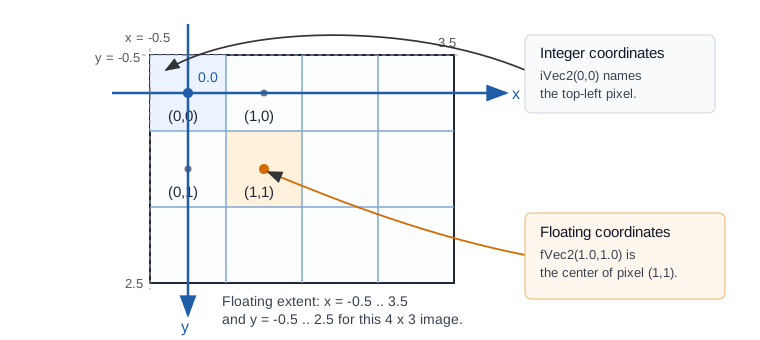
TGX uses the usual framebuffer coordinate system: the pixel (0,0) is located at the top-left corner of the image, the X coordinate grows to the right, and the Y coordinate grows downward.
pixel_coordinates

Pixel addressing varies slightly when using integer-valued coordinates vs floating point-valued coordinates:

Coordinate type Meaning of (i,j) Whole image box for an image of size lx x ly
iVec2, iBox2 Pixel index/location iBox2(0, lx - 1, 0, ly - 1)
fVec2, fBox2 Center of pixel (i,j) fBox2(-0.5f, lx - 0.5f, -0.5f, ly - 0.5f)

For example, the floating point box occupied by pixel (0,0) is fBox2(-0.5f, 0.5f, -0.5f, 0.5f), centered at fVec2(0.0f, 0.0f).

The difference matters when mixing exact pixel primitives and anti-aliased or sub-pixel primitives. As a rule of thumb, use integer coordinates for exact pixel primitives and floating point coordinates for anti-aliased or sub-pixel primitives.

Vector and box classes

The tgx library defines classes for 2D vectors and boxes:

Class Meaning
tgx::iVec2 Integer-valued 2D vector, used for pixel locations.
tgx::fVec2 Floating point-valued 2D vector, used for sub-pixel precision.
tgx::iBox2 Integer-valued 2D box, used to represent a rectangular pixel region.
tgx::fBox2 Floating point-valued 2D box, used to represent a sub-pixel rectangular region.
Note
3D variants for vectors and boxes are also available: tgx::iVec3, tgx::fVec3, tgx::iBox3, tgx::fBox3. See the 3D API tutorial for details.

Vectors and boxes support the usual operations: arithmetic (addition, scalar multiplication, dot product...), copy and type conversion.

tgx::iVec2 p(10, 30); // integer-valued vector
tgx::fVec2 q = p; // conversion to floating point: (10.0f, 30.0f)
tgx::fVec2 r = { 2.0f, 7.0f };
tgx::fVec2 s = (q + r) * 3.0f;
s.x = 4.0f; // direct access to coordinate values
Generic 2D vector [specializations iVec2, fVec2, dVec2].
Definition: Vec2.h:64
T x
'x' coordinate (first dimension)
Definition: Vec2.h:72

Boxes use the order (minx, maxx, miny, maxy):

tgx::iBox2 B(40, 80, 20, 30); // integer box [40,80] x [20,30]
Generic 2D Box [specializations iBox2 , fBox2, dBox2].
Definition: Box2.h:151

Integer boxes are inclusive: both min and max coordinates belong to the box. Therefore, the width of the box above is 80 - 40 + 1 = 41 pixels. This differs from half-open rectangle conventions used by some other libraries.

Most drawing methods take vectors and boxes as input parameters instead of scalars. It is recommended to use initializer lists to make the code more readable. For example, write {10, 20} instead of tgx::iVec2(10, 20).

// assume below that `im` is a tgx::Image<tgx::RGB32> object
im.drawCircle({10, 30}, 12, tgx::RGB32_Red);
im.drawCircleAA({50.0f, 60.0f}, 11.5f, tgx::RGB32_Blue);
im.fillRect({50, 60, 70, 80}, tgx::RGB32_Black);
const RGB32 RGB32_Blue
Color blue in RGB32 format.
const RGB32 RGB32_Black
Color black in RGB32 format.
void fillRect(const iBox2 &B, color_t color, float opacity=TGX_DEFAULT_NO_BLENDING)
Draw a filled rectangle.
void drawCircleAA(fVec2 center, float r, color_t color, float opacity=1.0f)
Draw a circle (high quality).

Common beginner mistakes

  • Do not let the pixel buffer go out of scope while an Image still points to it.
  • Remember that sub-image coordinates are local to the sub-image.
  • Remember that integer boxes are inclusive.
  • Use the native channel range when constructing low-level colors such as RGB565(31, 63, 31). Use float constructors such as RGB565(1.0f, 1.0f, 1.0f) when you want normalized color values.

Storing images in C++ source files

The memory buffer an image points to may reside in flash/ROM and it is possible to define const images directly in .cpp files for easy inclusion in a project.

For example, the 10x10 image

smiley_icon

can be stored as:

// macro to make the array more readable/compact.
#define C(val) tgx::RGB565((uint16_t)val)
// image data; the PROGMEM keyword ensures that the image is stored in FLASH memory.
const tgx::RGB565 smiley_data[] PROGMEM = {
C(0xffff), C(0xffff), C(0xf714), C(0xe609), C(0xdd40), C(0xdd40), C(0xe609), C(0xf714), C(0xffff), C(0xffff),
C(0xffff), C(0xee8f), C(0xddc6), C(0xeef1), C(0xfffb), C(0xfffb), C(0xeef1), C(0xddc6), C(0xee8f), C(0xffff),
C(0xeef4), C(0xdda5), C(0xf775), C(0xffd8), C(0xffd8), C(0xffd8), C(0xffd8), C(0xf775), C(0xdda5), C(0xeef4),
C(0xd5a9), C(0xee8d), C(0xff94), C(0x9b20), C(0xff94), C(0xff94), C(0x9b20), C(0xff94), C(0xee8d), C(0xd5a9),
C(0xc4a0), C(0xff50), C(0xff50), C(0xff50), C(0xff50), C(0xff50), C(0xff50), C(0xff50), C(0xff50), C(0xc4a0),
C(0xbc60), C(0xff0b), C(0xff0b), C(0xff0b), C(0xff0b), C(0xff0b), C(0xff0b), C(0xff0b), C(0xff0b), C(0xbc60),
C(0xc4e8), C(0xe5c4), C(0xfea6), C(0xaba0), C(0xfea6), C(0xfea6), C(0xaba0), C(0xfea6), C(0xe5c4), C(0xc4e8),
C(0xd612), C(0xc481), C(0xf622), C(0xdd40), C(0x9b20), C(0x9b20), C(0xdd40), C(0xf622), C(0xc481), C(0xd612),
C(0xf79e), C(0xc54d), C(0xbc60), C(0xdd60), C(0xfe40), C(0xfe40), C(0xdd60), C(0xbc60), C(0xc54d), C(0xf79e),
C(0xffff), C(0xef7d), C(0xcdd2), C(0xb4a8), C(0xaba0), C(0xaba0), C(0xb4a8), C(0xcdd2), C(0xef7d), C(0xffff) };
// image object, 10x10 image with smiley_data as pixel buffer.
const tgx::Image<tgx::RGB565> smiley(smiley_data, 10, 10);

The /tools/ subdirectory of the library contains the tgx_image.py graphical converter and the advanced cli_tools/tgx_image_cli.py command-line converter. They turn classical image files (PNG/JPEG/BMP...) into TGX image headers or .h + .cpp pairs.

Note
The TGX library also makes it easy to directly load PNG, JPEG and GIF images (which may be stored in RAM/FLASH or on another medium such as an SD card) by using bindings with external libraries. See section TGX extensions via external libraries for more details.

Copying/converting images to different color types

Recall that a tgx::Image object is just a view into a buffer of pixels of a given color type. Thus, copies of image objects are shallow (they share the same image buffer / same color type).

The library provides methods to create "deep" copies and convert images to different color types:

tgx::RGB32 buf1[100*100]; // buffer for a 100x100 image in RGB32 color format
tgx::Image<tgx::RGB32> im1(buf1, 100, 100); // image that encapsulates the pixel buffer buf1
// ... draw some things on im1...
tgx::RGB24 buf2[50 * 50]; // buffer for a 50x50 image in RGB24 color format
tgx::Image<tgx::RGB24> im2(buf2, 50, 50); // image that encapsulates the pixel buffer buf2
// copy the content of im1/buf1 into im2/buf2, resize and perform color conversion automatically.
im2.copyFrom(im1);
// we can directly change the color type of im1 in place from RGB32 to RGB565
// ok, now im3 has the same content as im1 had, but in RGB565 color format.
// Beware that im1 now contains 'garbage' (seen as RGB32 data) but writing
// on im1 will change the content of im3 as they share the same buffer !
Image< color_dst > convert()
Convert this image to another type.
Color in R8/G8/B8 format.
Definition: Color.h:681
Note
See also the methods for blitting sprites which may be used for copy and color type conversion.

Where to go next

You now know how TGX images store pixels, how coordinates work, and how image objects refer to their pixel buffers.

Choose the next tutorial depending on what you want to draw:

Goal Continue with
Draw pixels, lines, rectangles, circles, curves, sprites, text, image blits or 2D user-interface elements. The 2D API tutorial
Render 3D primitives, meshes, lights, textures, Z-buffered scenes, cameras and projections. The 3D API tutorial

Of course, projects can use both parts together: the 3D renderer draws into an image, and the 2D API can then overlay text, user-interface elements, debug information or sprites on top of the rendered frame.