TGX 1.1.1
A tiny 2D/3D graphics library optimized for 32 bits microcontrollers.
Loading...
Searching...
No Matches
Using the 2D API.

This page describes, with examples, most 2D drawing primitives implemented in TGX.

  • For additional details, see the main header file Image.h.
  • Do not forget to check the examples located in the /examples/ subdirectory of the library. In particular, the example TestPrimitives contains all the code listed below.

Overview of the 2D API

The 2D API is centered around the tgx::Image class. Drawing methods modify the pixels of an image, or of a sub-image when clipping to a rectangular region is needed.

The API is roughly organized into the following groups:

Group Main purpose Typical methods
Pixel access Read or write individual pixels. drawPixel(), drawPixelf(), readPixel(), operator()
Image copy and blitting Copy, blend, scale, rotate or mask another image. blit(), blitMasked(), blitRotated(), blitScaledRotated(), copyFrom()
Fast primitives Draw simple integer-coordinate shapes as quickly as possible. drawLine(), drawFastHLine(), fillRect(), fillTriangle(), fillCircle()
High-quality primitives Draw anti-aliased shapes with floating-point coordinates and sub-pixel precision. drawLineAA(), drawThickLineAA(), fillPolygonAA(), fillCircleAA()
Text Draw built-in bitmap fonts, measure text, or place text using anchors. drawText(), drawTextEx(), measureText(), measureChar()
External image/font bindings Use optional decoder or font-rendering libraries when they are available. PNGDecode(), JPEGDecode(), GIFplayFrame(), setOpenFontRender()
Note
The list above is only a map of the API. The detailed examples and method lists are given below.

Naming conventions

Most 2D drawing methods follow a small set of naming rules. Once these rules are known, method names become fairly predictable:

Name part Meaning Examples
draw... Draw only the outline of a shape. drawLine(), drawRect(), drawCircle()
fill... Draw the interior of a shape. Some filled methods can also take an outline color. fillRect(), fillTriangle(), fillCircle()
Thick Use a thicker outline. drawThickRect(), drawThickLineAA(), fillThickCircleAA()
AA High-quality anti-aliased version. These methods usually use floating-point coordinates and sub-pixel precision. drawLineAA(), fillPolygonAA(), drawThickEllipseAA()
Fast Specialized fast version for common cases. drawFastHLine(), drawFastVLine()
Masked Use one source color as transparent. blitMasked(), drawTexturedMaskedTriangle()
Gradient Interpolate colors across the shape. fillScreenVGradient(), drawGradientTriangle()
Textured Map an image onto a triangle or quad. drawTexturedTriangle(), drawTexturedQuad()

As a rule of thumb, use the non-AA integer methods for static, pixel-aligned graphics and use the AA methods when shapes move smoothly, use non-integer coordinates, have diagonal edges, or need visually smooth outlines.

Performance and clipping

TGX is often used on small MCUs, so the 2D API tries to keep the common paths simple and fast. A few rules help when choosing between methods:

Situation Recommended approach
Pixel-aligned static graphics Prefer integer, non-AA methods such as drawLine(), fillRect(), fillTriangle() or fillCircle().
Smooth motion, diagonal edges or sub-pixel placement Use the AA methods when the visual quality matters. They are usually more expensive.
Repeated horizontal or vertical lines Prefer drawFastHLine() and drawFastVLine() over the general line method.
Drawing inside a rectangular panel, widget or viewport Create a sub-image and draw into it. Sub-images are cheap and automatically clip drawing to their own bounds.
Copying rectangular images Prefer blit() or copyFrom() over manual pixel loops.
Large sprites, textures or fonts on MCUs Keep frequently used pixel data in fast memory when the platform provides several memory regions.

Most public drawing methods clip their output to the current image or sub-image. Direct pixel access with operator() is intentionally different: it gives raw access to the buffer and assumes that the coordinates are valid.
2D drawing methods

Filling the screen

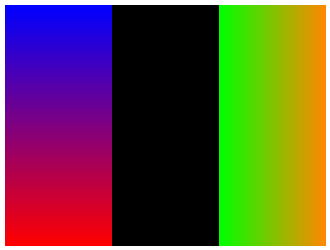
test_screen_filling

Method Description
clear() Set all pixels of the image to the same color.
fillScreen() Same as clear().
fillScreenVGradient() Fill the image with a vertical gradient between two colors.
fillScreenHGradient() Fill the image with a horizontal gradient between two colors.

Code used to generate the image:

tgx::RGB32 buffer[320*240]; //
tgx::Image<tgx::RGB32> im(buffer, 320, 240); // create a 320x240 image.
im.fillScreen(tgx::RGB32_Black); // same as im.clear(tgx::RGB32_Black);
auto im1 = im(0, 106, 0, 240); // create subimage = left third of the image
im1.fillScreenVGradient(tgx::RGB32_Blue, tgx::RGB32_Red); // fill with vertical gradient from blue to red
auto im2 = im(214, 320, 0, 240); // create subimage = right third of the image
im2.fillScreenHGradient(tgx::RGB32_Green, tgx::RGB32_Orange); // fill with horizontal gradient from green to orange
Image class [MAIN CLASS FOR THE 2D API].
Definition: Image.h:145
Color in R8/G8/B8/A8 format.
Definition: Color.h:1176

Reading/writing pixels

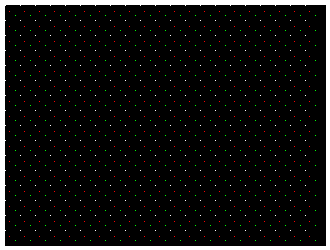
test_points

Method Description
drawPixel() Set the color of a given pixel.
drawPixelf() Set the color of a given pixel, using a floating-point position vector.
readPixel() Read the color of a pixel.
readPixelf() Read the color of a pixel, using a floating-point position vector.
operator() Direct access to the pixel color memory location (read/write).

Code used to generate the image:

tgx::RGB32 buffer[320*240]; //
tgx::Image<tgx::RGB32> im(buffer, 320, 240); // create a black 320x240 image.
im.clear(tgx::RGB32_Black); //
for (int i = 0; i < 310; i += 15) {
for (int j = 0; j < 230; j += 15){
im.drawPixel({ i, j }, tgx::RGB32_White); // integer valued position vector
im.drawPixelf({ i + 4.4f, j + 5.6f }, tgx::RGB32_Red); // floating-point valued position vector
im(i+10, j+10) = tgx::RGB32_Green; // direct access to the memory location of the pixel.
}
}
const RGB32 RGB32_Red
Color red in RGB32 format.
const RGB32 RGB32_Green
Color green in RGB32 format.

Flood-filling a region

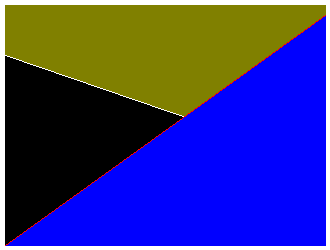
test_region_filling

Method Description
fill(start_pos, new_color) Fill a connected component with a given color.
fill(start_pos, border_color, new_color) Fill a region delimited by a given color.

Code used to generate the image:

tgx::RGB32 buffer[320*240]; //
tgx::Image<tgx::RGB32> im(buffer, 320, 240); // create a black 320x240 image.
im.clear(tgx::RGB32_Black); //
im.drawLine({ 0,50 }, { 320,160 }, tgx::RGB32_White);
im.drawLine({ 0,240 }, { 320,10 }, tgx::RGB32_Red);
im.fill({ 319,239 }, tgx::RGB32_Red, tgx::RGB32_Blue); // fill starting {319,239}, region delimited by the red line
im.fill({ 0,0 }, tgx::RGB32_Olive); // fill starting {0,0}
const RGB32 RGB32_Blue
Color blue in RGB32 format.
const RGB32 RGB32_White
Color white in RGB32 format.
const RGB32 RGB32_Olive
Color olive in RGB32 format.

Blitting sprites

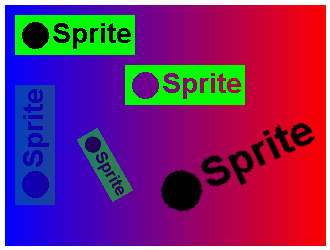
test_blitting

Blitting means copying pixels from a source image (the sprite) into a destination image. This is the usual way to draw small images, icons, sprites, off-screen buffers or pre-rendered UI elements.

Method Description
blit(sprite, pos, opacity) Copy the sprite at a given position, with optional opacity.
blitMasked(sprite, mask_color, pos, opacity) Copy the sprite but skip pixels that match a transparent color.
blitRotated(sprite, pos, angle, opacity) Rotate the sprite by a quarter turn (0, 90, 180 or 270 degrees) before drawing it.
blitScaledRotated(sprite, pos_src, pos_dst, scale, angle, opacity) Scale and rotate the sprite by an arbitrary angle around a source anchor point.
blitScaledRotatedMasked(sprite, mask_color, pos_src, pos_dst, scale, angle, opacity) Same as blitScaledRotated(), but with one transparent source color.
copyFrom() Copy and resize another image into the whole destination image, possibly converting color types.

All blit methods clip automatically to the destination image or sub-image. Advanced overloads also accept a custom blending operator instead of the standard opacity parameter.

Code used to generate the image:

// create a sprite:
// #include <font_tgx_Arial_Bold.h> is needed to use font_tgx_Arial_Bold_20.
tgx::RGB32 buf[120 * 40]; // memory for the sprite image
tgx::Image<tgx::RGB32> sprite(buf, 120, 40); // the sprite image...
sprite.clear(tgx::RGB32_Green); // ... has a green background
sprite.fillCircle({ 20, 20 }, 13, tgx::RGB32_Black, tgx::RGB32_Black); // ... a black circle
sprite.drawTextEx("Sprite", { 76, 20 }, font_tgx_Arial_Bold_20, tgx::Anchor::CENTER, false, false, tgx::RGB32_Black); // ... and the black text "sprite".
im.fillScreenHGradient(tgx::RGB32_Blue, tgx::RGB32_Red); // fill the screen with a horizontal gradient from blue to red
im.blit(sprite, { 10, 10 }); // simple blitting
im.blitRotated(sprite, { 10, 80 }, 270, 0.25f); // blit the sprite rotated by 270 degrees clockwise, 25% opacity
im.blitMasked(sprite, tgx::RGB32_Black, { 120,60 }); // blit the sprite with black as the transparent color.
im.blitScaledRotated(sprite, { 60, 20 }, { 100, 160 }, 0.6f, 60.0f, 0.5f); // blit the sprite scaled at 0.6, rotated by 60 degrees, half opacity
im.blitScaledRotatedMasked(sprite, tgx::RGB32_Green, { 60, 20 }, { 230, 160 }, 1.5f, -25.0f); // blit the sprite scaled at 1.5, rotated by -25 degrees, with green set as the transparent color.
const RGB32 RGB32_Black
Color black in RGB32 format.
const ILI9341_t3_font_t font_tgx_Arial_Bold_20
Arial font (bold) 20pt.

See also blitBackward() and methods for image copying, resizing and color type conversion: copyFrom(), copyReduceHalf(), reduceHalf() and convert().

Drawing horizontal and vertical lines

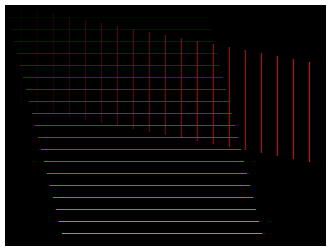
test_vhlines

Use these methods when drawing parallel lines as they are faster than the general line drawing methods.

Method Description
drawFastVLine() Draw a vertical line segment.
drawFastHLine() Draw a horizontal line segment.

Code used to generate the image:

tgx::RGB32 buffer[320*240]; //
tgx::Image<tgx::RGB32> im(buffer, 320, 240); // create a black 320x240 image.
im.clear(tgx::RGB32_Black); //
for (int i = 0; i < 20; i++) {
im.drawFastVLine({ i * 16, i * 3 }, 100, tgx::RGB32_Red, i / 20.0f); // draw a vertical line
im.drawFastHLine({ i * 3, i * 12 }, 200, tgx::RGB32_Green, i / 20.0f); // draw a horizontal line
}

Drawing lines

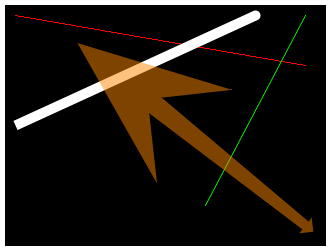
test_lines

Method Description
drawLine() Draw a basic straight line (single pixel thick, no anti-aliasing). Fastest method.
drawSegment() Draw a basic line segment and choose independently whether each endpoint is drawn.
drawLineAA() Draw a line segment with anti-aliasing (single pixel thick).
drawThickLineAA() Draw a thick line with anti-aliasing and specify how the ends are drawn (rounded, flat, arrows...).
drawWedgeLineAA() Draw a line segment with anti-aliasing and varying thickness, and specify how the ends are drawn.

Code used to generate the image:

tgx::RGB32 buffer[320*240]; //
tgx::Image<tgx::RGB32> im(buffer, 320, 240); // create a black 320x240 image.
im.clear(tgx::RGB32_Black); //
im.drawLine({ 10,10 }, { 300, 60 }, tgx::RGB32_Red); // simple red line
im.drawLineAA({ 200,200 }, { 300, 10 }, tgx::RGB32_Green); // green line with anti-aliasing
im.drawThickLineAA({ 10, 120 }, { 250, 10 }, 10, tgx::END_STRAIGHT, tgx::END_ROUNDED, tgx::RGB32_White); // thick line, rounded at the start, straight at the end.
im.drawWedgeLineAA({ 300, 220 }, { 150, 100 }, 10, tgx::END_ARROW_1, 20, tgx::END_ARROW_SKEWED_5,tgx::RGB32_Orange, 0.5f); // wedge line ending with arrows, half opacity.
const RGB32 RGB32_Orange
Color orange in RGB32 format.
@ END_ROUNDED
rounded end.
Definition: Image.h:53
@ END_STRAIGHT
straight end.
Definition: Image.h:52
@ END_ARROW_1
tiny arrow head [extends = line thickness]
Definition: Image.h:54
@ END_ARROW_SKEWED_5
huge skewed arrow head [extends = 5 x line thickness]
Definition: Image.h:63

Drawing rectangles

test_rectangles

Method Description
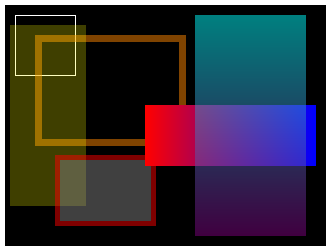
drawRect() Draw a basic rectangle. Fastest method.
drawThickRect() Draw a rectangle with a thick outline.
fillRect() Draw a filled rectangle.
fillThickRect() Draw a filled rectangle with a thick outline of a different color.
fillRectHGradient() Draw a filled rectangle with a horizontal gradient between two colors.
fillRectVGradient() Draw a filled rectangle with a vertical gradient between two colors.

See also drawThickRectAA(), fillRectAA(), fillThickRectAA(). These methods may be useful for smooth animations but usually not for static display (as rectangle edges are parallel to pixel boundaries and therefore do not usually require anti-aliasing).

Code used to generate the image:
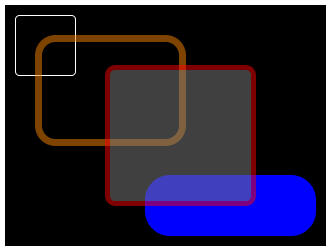
tgx::RGB32 buffer[320*240]; //
tgx::Image<tgx::RGB32> im(buffer, 320, 240); // create a black 320x240 image.
im.clear(tgx::RGB32_Black); //
im.drawRect({ 10,70,10,70 }, tgx::RGB32_White); // simple white square, full opacity
im.drawThickRect({ 30,180,30,140 }, 7, tgx::RGB32_Orange, 0.5f); // 7 pixels thick orange rectangle, half opacity
im.fillRect({5, 80, 20, 200}, tgx::RGB32_Yellow, 0.25f); // yellow filled rectangle, 25% opacity
im.fillThickRect({ 50, 150, 150, 220 }, 5, tgx::RGB32_Gray, tgx::RGB32_Red, 0.5f); // gray filled, 5 pixels thick red rectangle, 50% opacity
im.fillRectHGradient({ 140, 310, 100, 160 }, tgx::RGB32_Red, tgx::RGB32_Blue); // rectangle filled with horizontal gradient from red to blue. full opacity.
im.fillRectVGradient({ 190, 300, 10, 230 }, tgx::RGB32_Cyan, tgx::RGB32_Purple, 0.5f); // rectangle filled with vertical gradient from cyan to purple. half opacity.
const RGB32 RGB32_Cyan
Color cyan in RGB32 format.
const RGB32 RGB32_Yellow
Color yellow in RGB32 format.
const RGB32 RGB32_Gray
Color gray in RGB32 format.
const RGB32 RGB32_Purple
Color purple in RGB32 format.

Drawing rounded rectangles

test_rounded_rectangles

Method Description
drawRoundRect() Draw a single pixel thick rectangle with rounded corners. Fastest non-AA method.
fillRoundRect() Draw a filled rectangle with rounded corners. Fastest non-AA method.
drawRoundRectAA() Draw a single pixel thick rectangle with rounded corners, with anti-aliasing.
drawThickRoundRectAA() Draw a rounded-corner rectangle with a thick outline, with anti-aliasing.
fillRoundRectAA() Draw a filled rectangle with rounded corners, with anti-aliasing.
fillThickRoundRectAA() Draw a filled rectangle with rounded corners and a thick outline of a different color, with anti-aliasing.

Code used to generate the image:

tgx::RGB32 buffer[320*240]; //
tgx::Image<tgx::RGB32> im(buffer, 320, 240); // create a black 320x240 image.
im.clear(tgx::RGB32_Black); //
im.drawRoundRectAA({ 10,70,10,70}, 4, tgx::RGB32_White); // simple 4-pixels rounded square
im.drawThickRoundRectAA({ 30,180,30,140 }, 20, 7, tgx::RGB32_Orange, 0.5f); // 7 pixels thick, 20 pixels rounded corner rectangle, half opacity
im.fillRoundRectAA({ 140, 310, 170, 230 }, 25, tgx::RGB32_Blue); // filled 25-pixel rounded corner rectangle
im.fillThickRoundRectAA({ 100, 250, 60, 200 }, 10, 5, tgx::RGB32_Gray, tgx::RGB32_Red, 0.5f); // 5 pixels thick, 10 pixel rounded corner rectangle, 50% opacity

Drawing triangles

test_triangles

Method Description
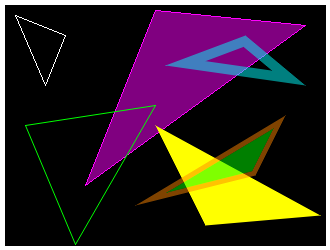
drawTriangle() Draw a simple triangle. Fastest method.
fillTriangle() Draw a simple filled triangle. Fastest method.
drawTriangleAA() Draw a triangle with a single pixel thick outline, with anti-aliasing.
drawThickTriangleAA() Draw a triangle with a thick outline, with anti-aliasing.
fillTriangleAA() Draw a filled triangle with anti-aliasing.
fillThickTriangleAA() Draw a filled triangle with a thick outline of a different color, with anti-aliasing.

Code used to generate the image:

tgx::RGB32 buffer[320*240]; //
tgx::Image<tgx::RGB32> im(buffer, 320, 240); // create a black 320x240 image.
im.clear(tgx::RGB32_Black); //
im.drawTriangle({ 10,10 }, { 60, 30 }, {40, 80}, tgx::RGB32_White); // simple triangle
im.fillTriangle({150, 5}, {80, 180}, {300, 20} , tgx::RGB32_Purple, tgx::RGB32_Magenta); // filled triangle with border
im.drawTriangleAA({ 20,120 }, { 150, 100 }, { 70, 239}, tgx::RGB32_Green); // green triangle with AA
im.drawThickTriangleAA({ 160, 60 }, {240,30}, {300, 80}, 10, tgx::RGB32_Cyan, 0.5f); // 10 pixels thick triangle, 50% opacity, with AA
im.fillTriangleAA({ 200, 220 }, { 315,210 }, { 150, 120 }, tgx::RGB32_Yellow); // filled triangle with AA.
im.fillThickTriangleAA({ 130,200 }, { 280, 110 }, {250, 170}, 5, tgx::RGB32_Lime, tgx::RGB32_Orange, 0.5f); // filled 5 pixels thick triangle, 50% opacity, with AA
const RGB32 RGB32_Magenta
Color majenta in RGB32 format.
const RGB32 RGB32_Lime
Color lime in RGB32 format.

Drawing triangles (advanced)

test_triangles_advanced

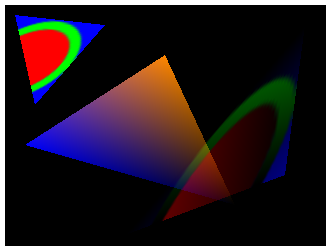
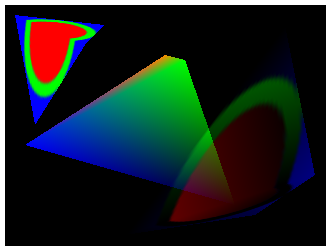
These methods are still part of the 2D API, but internally they use the TGX triangle rasterizer. They are useful when an image or a color field must be warped onto an arbitrary triangle instead of copied as a rectangle. They are more expensive than a simple blit(), but they interpolate texture coordinates, vertex colors, or both across the triangle.

Method Description
drawTexturedTriangle() Draw a filled triangle with texture mapping.
drawTexturedTriangle(..., blend_op) Draw a textured triangle using a custom blending operator, function, functor or lambda.
drawGradientTriangle() Draw a filled triangle with gradient color (Gouraud shading).
drawTexturedGradientTriangle() Draw a filled triangle with both texture mapping and gradient color.
drawTexturedMaskedTriangle() Draw a textured triangle while skipping one transparent source color.
drawTexturedGradientMaskedTriangle() Draw a textured gradient triangle while skipping one transparent source color.

Code used to generate the image:

tgx::RGB32 buffer[320*240]; //
tgx::Image<tgx::RGB32> im(buffer, 320, 240); // create a black 320x240 image.
im.clear(tgx::RGB32_Black); //
tgx::RGB32 buf[50 * 50]; // memory for texture image
tgx::Image<tgx::RGB32> tex(buf, 50, 50); // the texture image...
tex.clear(tgx::RGB32_Blue); // ... has a blue background
tex.fillThickCircleAA({ 25,25 }, 24, 5, tgx::RGB32_Red, tgx::RGB32_Green); // ... and a red-filled circle with green outline in the center.
im.drawTexturedTriangle(tex, { 0,0 }, { 50, 0 }, { 50, 50 }, { 10, 10 }, { 100, 20 }, { 30, 100 }); // textured triangle, full opacity
im.drawGradientTriangle({ 20, 140 }, { 160, 50 }, {230, 200}, tgx::RGB32_Blue, tgx::RGB32_Orange, tgx::RGB32_Black); // gradient triangle, full opacity.
im.drawTexturedGradientTriangle(tex, { 0,0 }, { 50, 0 }, { 50, 50 } , { 120, 230 }, { 300, 20 }, { 280, 170 }, tgx::RGB32_Red, tgx::RGB32_Green, tgx::RGB32_Blue, 0.5f); // textured triangle with color gradient, half opacity.

Drawing quads

test_quads

Method Description
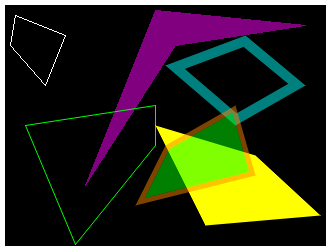
drawQuad() Draw a simple quad. Fastest method.
fillQuad() Draw a simple filled quad. Fastest method.
drawQuadAA() Draw a quad with a single pixel thick outline, with anti-aliasing.
drawThickQuadAA() Draw a quad with a thick outline, with anti-aliasing.
fillQuadAA() Draw a filled quad with anti-aliasing.
fillThickQuadAA() Draw a filled quad with a thick outline of a different color, with anti-aliasing.

Code used to generate the image:

tgx::RGB32 buffer[320*240]; //
tgx::Image<tgx::RGB32> im(buffer, 320, 240); // create a black 320x240 image.
im.clear(tgx::RGB32_Black); //
im.drawQuad({ 10,10 }, { 60, 30 }, { 40, 80 }, {5, 40}, tgx::RGB32_White); // simple quad
im.fillQuad({ 150, 5 }, { 80, 180 }, {170, 40}, { 300, 20 }, tgx::RGB32_Purple); // filled quad
im.drawQuadAA({ 20,120 }, { 150, 100 }, { 150, 140 }, { 70, 239 }, tgx::RGB32_Green); // green quad with AA
im.drawThickQuadAA({ 160, 60 }, { 240,30 }, { 300, 80 }, {230, 120}, 10, tgx::RGB32_Cyan, 0.5f); // 10 pixels thick quad, 50% opacity, with AA
im.fillQuadAA({ 200, 220 }, { 315,210 }, {250, 150}, { 150, 120 }, tgx::RGB32_Yellow); // filled quad with AA
im.fillThickQuadAA({ 130,200 }, { 160, 140 }, { 230, 100 }, { 250, 170 } , 5, tgx::RGB32_Lime, tgx::RGB32_Orange, 0.5f); // filled, 5 pixels thick quad, 50% opacity, with AA

Drawing quads (advanced)

test_quad_advanced

These methods are still part of the 2D API, but internally they use the TGX triangle rasterizer. They are useful when an image or a color field must be warped onto an arbitrary quad instead of copied as a rectangle. They are more expensive than a simple blit(), but they interpolate texture coordinates, vertex colors, or both across the quad.

Method Description
drawTexturedQuad() Draw a filled quad with texture mapping.
drawTexturedQuad(..., blend_op) Draw a textured quad using a custom blending operator, function, functor or lambda.
drawGradientQuad() Draw a filled quad with gradient color (Gouraud shading).
drawTexturedGradientQuad() Draw a filled quad with both texture mapping and gradient color.
drawTexturedMaskedQuad() Draw a textured quad while skipping one transparent source color.
drawTexturedGradientMaskedQuad() Draw a textured gradient quad while skipping one transparent source color.

Code used to generate the image:

tgx::RGB32 buffer[320*240]; //
tgx::Image<tgx::RGB32> im(buffer, 320, 240); // create a black 320x240 image.
im.clear(tgx::RGB32_Black); //
im.drawTexturedQuad(tex, { 0,0 }, { 50, 0 }, { 50, 50 }, { 0, 50 }, { 10, 10 }, { 100, 20 }, { 80, 40 }, {30, 120}); // textured quad
im.drawGradientQuad({ 20, 140 }, { 160, 50 }, {180, 55}, { 230, 200 }, tgx::RGB32_Blue, tgx::RGB32_Orange, tgx::RGB32_Green, tgx::RGB32_Black); // gradient quad
im.drawTexturedGradientQuad(tex, { 0,0 }, { 50, 0 }, { 50, 50 }, { 0, 50 }, { 120, 230 }, { 280, 20 }, { 310, 170 }, {250,210}, tgx::RGB32_Red, tgx::RGB32_Green, tgx::RGB32_Blue, tgx::RGB32_Navy,0.5f); // textured quad with color gradient, half opacity.
const RGB32 RGB32_Navy
Color navy in RGB32 format.

Drawing polylines

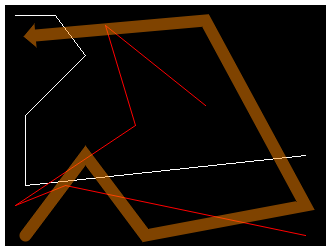
test_polylines

Method Description
drawPolyline() Draw a simple polyline. Fastest method.
drawPolylineAA() Draw a polyline with anti-aliasing.
drawThickPolylineAA() Draw a thick polyline with anti-aliasing and specify how the endings look.

Code used to generate the image:

tgx::RGB32 buffer[320*240]; //
tgx::Image<tgx::RGB32> im(buffer, 320, 240); // create a black 320x240 image.
im.clear(tgx::RGB32_Black); //
const tgx::iVec2 tabPoints1[] = { {10, 10}, {50, 10}, {80, 50}, {20, 110}, {20, 180}, {300, 150} };
im.drawPolyline(6, tabPoints1, tgx::RGB32_White); // simple polyline
const tgx::fVec2 tabPoints2[] = { {200, 100}, {100, 20}, {130, 120}, {10, 200}, {60, 180}, {300, 230} };
im.drawPolylineAA(6, tabPoints2, tgx::RGB32_Red); // polyline with AA
const tgx::fVec2 tabPoints3[] = { {30, 30}, {200, 15}, {300, 200}, {140, 230}, {80, 150}, {20, 230} };
im.drawThickPolylineAA(6, tabPoints3, 12, tgx::END_ARROW_1, tgx::END_ROUNDED, tgx::RGB32_Orange, 0.5f); // thick polyline, arrow at start, rounded at end, half opacity, with AA
Generic 2D vector [specializations iVec2, fVec2, dVec2].
Definition: Vec2.h:64

Drawing polygons

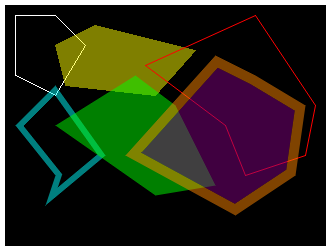
test_polygons

Method Description
drawPolygon() Draw a simple polygon. Fastest method.
fillPolygon() Draw a simple filled polygon. Fastest method.
drawPolygonAA() Draw a polygon with anti-aliasing.
drawThickPolygonAA() Draw a polygon with a thick outline, with anti-aliasing.
fillPolygonAA() Draw a filled polygon with anti-aliasing.
fillThickPolygonAA() Draw a filled polygon with a thick outline, with anti-aliasing.

Code used to generate the image:

tgx::RGB32 buffer[320*240]; //
tgx::Image<tgx::RGB32> im(buffer, 320, 240); // create a black 320x240 image.
im.clear(tgx::RGB32_Black); //
tgx::iVec2 tabPoints1[] = { {10, 10}, {50, 10}, {80, 40}, {50, 90}, {10, 70} };
im.drawPolygon(5, tabPoints1, tgx::RGB32_White); // simple polygon
tgx::iVec2 tabPoints2[] = { {90, 20}, {50, 40}, {60, 80}, {150, 90}, {190, 45} };
im.fillPolygon(5, tabPoints2, tgx::RGB32_Yellow, 0.5f); // filled polygon, half opacity.
tgx::fVec2 tabPoints3[] = { {140, 60}, {250, 10}, {310, 100}, {300, 150}, {240, 170}, {220, 120} };
im.drawPolygonAA(6, tabPoints3, tgx::RGB32_Red); // polygon with AA
tgx::fVec2 tabPoints4[] = { {10, 120}, {50, 80}, {100, 150}, {40, 200}, {50, 170} };
im.drawThickPolygonAA(5, tabPoints4, 6, tgx::RGB32_Cyan, 0.5f); // thick polygon, 50% opacity, with AA
tgx::fVec2 tabPoints5[] = { {50, 120}, {130, 70}, {170, 100}, {210, 180}, {150, 190} };
im.fillPolygonAA(5, tabPoints5, tgx::RGB32_Lime, 0.5f); // filled polygon, 50% opacity, with AA
tgx::fVec2 tabPoints6[] = { {120, 150}, {210, 50}, {250, 70}, {300, 100}, {290, 170}, {230, 210} };
im.fillThickPolygonAA(6, tabPoints6, 10, tgx::RGB32_Purple, tgx::RGB32_Orange, 0.5f); // filled thick polygon, 50% opacity, with AA

Drawing circles

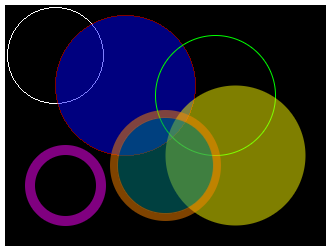
test_circles

Method Description
drawCircle() Draw a simple circle. Fastest method.
fillCircle() Draw a simple filled circle. Fastest method.
drawCircleAA() Draw a circle with anti-aliasing.
drawThickCircleAA() Draw a circle with a thick outline, with anti-aliasing.
fillCircleAA() Draw a filled circle with anti-aliasing.
fillThickCircleAA() Draw a filled circle with a thick outline, with anti-aliasing.

Code used to generate the image:

tgx::RGB32 buffer[320*240]; //
tgx::Image<tgx::RGB32> im(buffer, 320, 240); // create a black 320x240 image.
im.clear(tgx::RGB32_Black); //
im.drawCircle({50, 50}, 48, tgx::RGB32_White); // simple circle
im.fillCircle({ 120, 80 }, 70, tgx::RGB32_Blue, tgx::RGB32_Red, 0.5f); // filled circle, 50% opacity
im.drawCircleAA({210, 90}, 60, tgx::RGB32_Green); // green circle with AA
im.drawThickCircleAA({60, 180}, 40, 10, tgx::RGB32_Purple); // thick purple circle, with AA
im.fillCircleAA({230, 150}, 70, tgx::RGB32_Yellow, 0.5f); // filled circle with AA, 50% opacity
im.fillThickCircleAA({160,160}, 55, 8, tgx::RGB32_Teal, tgx::RGB32_Orange, 0.5f); // filled circle with thick outline, with AA, 50% opacity
const RGB32 RGB32_Teal
Color teal in RGB32 format.

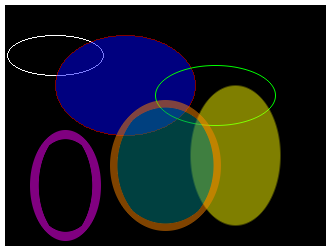
Drawing ellipses

test_ellipses

Method Description
drawEllipse() Draw a simple ellipse. Fastest method.
fillEllipse() Draw a simple filled ellipse. Fastest method.
drawEllipseAA() Draw an ellipse with anti-aliasing.
drawThickEllipseAA() Draw an ellipse with a thick outline, with anti-aliasing.
fillEllipseAA() Draw a filled ellipse with anti-aliasing.
fillThickEllipseAA() Draw a filled ellipse with a thick outline, with anti-aliasing.

Code used to generate the image:

tgx::RGB32 buffer[320*240]; //
tgx::Image<tgx::RGB32> im(buffer, 320, 240); // create a black 320x240 image.
im.clear(tgx::RGB32_Black); //
im.drawEllipse({ 50, 50 }, { 48, 20 }, tgx::RGB32_White); // simple ellipse
im.fillEllipse({ 120, 80 }, { 70, 50 }, tgx::RGB32_Blue, tgx::RGB32_Red, 0.5f); // filled ellipse, 50% opacity
im.drawEllipseAA({ 210, 90 }, { 60, 30 }, tgx::RGB32_Green); // ellipse with AA
im.drawThickEllipseAA({ 60, 180 }, { 35, 55 }, 10, tgx::RGB32_Purple); // thick ellipse, with AA
im.fillEllipseAA({ 230, 150 }, { 45, 70 }, tgx::RGB32_Yellow, 0.5f); // filled ellipse with AA, 50% opacity
im.fillThickEllipseAA({ 160,160 }, { 55, 65 }, 8, tgx::RGB32_Teal, tgx::RGB32_Orange, 0.5f); // filled ellipse with thick outline, with AA, 50% opacity

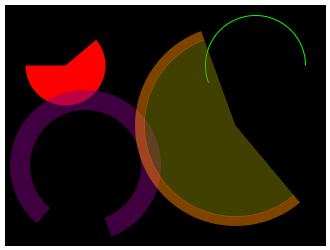
Drawing circle arcs and pies

test_arc_pies

Method Description
fillCircleSectorAA() Draw a circle sector (pie), with anti-aliasing.
drawCircleArcAA() Draw a single-pixel circle arc, with anti-aliasing.
drawThickCircleArcAA() Draw a thick circle arc, with anti-aliasing.
fillThickCircleSectorAA() Draw a circle sector (pie) with a thick outline arc, with anti-aliasing.

Code used to generate the image:

tgx::RGB32 buffer[320*240]; //
tgx::Image<tgx::RGB32> im(buffer, 320, 240); // create a black 320x240 image.
im.clear(tgx::RGB32_Black); //
im.fillCircleSectorAA({ 60,60 }, 40, 50, 270, tgx::RGB32_Red); // filled circle sector between 50 and 270 degrees
im.drawCircleArcAA({250, 60}, 50, 250, 90, tgx::RGB32_Green); // green circle arc from 250 to 90 degrees
im.drawThickCircleArcAA({80, 160}, 75, 220, 160, 20, tgx::RGB32_Purple, 0.5f); // thick circle arc from 220 to 160 degrees, 50% opacity
im.fillThickCircleSectorAA({230, 120}, 100, 140, 340, 10, tgx::RGB32_Olive, tgx::RGB32_Orange, 0.5f); // filled thick circle sector from 140 to 340 degrees, 50% opacity

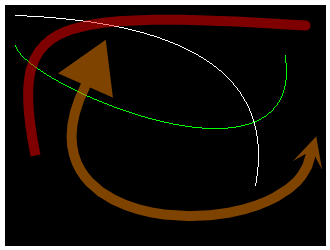
Drawing Bezier curves

test_bezier_curves

Method Description
drawQuadBezier() Draw a quadratic Bezier curve.
drawCubicBezier() Draw a cubic Bezier curve.
drawThickQuadBezierAA() Draw a thick quadratic Bezier curve, with anti-aliasing.
drawThickCubicBezierAA() Draw a thick cubic Bezier curve, with anti-aliasing.

Code used to generate the image:

tgx::RGB32 buffer[320*240]; //
tgx::Image<tgx::RGB32> im(buffer, 320, 240); // create a black 320x240 image.
im.clear(tgx::RGB32_Black); //
im.drawQuadBezier({ 10, 10 }, { 250, 180 }, {280, 20}, 1.0f, true, tgx::RGB32_White); // simple quadratic Bezier curve
im.drawCubicBezier({ 10, 40 }, { 280, 50 }, { 20, 80 }, { 300, 200 }, true, tgx::RGB32_Green); // simple cubic Bezier curve
im.drawThickQuadBezierAA({ 30, 150 }, { 300, 20 }, {0,0}, 2.0f, 10, tgx::END_STRAIGHT, tgx::END_ROUNDED, tgx::RGB32_Red, 0.5f); // thick quadratic Bezier curve, with AA, 50% opacity.
im.drawThickCubicBezierAA({ 80, 80 }, { 305, 150 }, { 0, 240 }, {290, 240}, 10, tgx::END_ARROW_5, tgx::END_ARROW_SKEWED_2, tgx::RGB32_Orange, 0.5f); // thick cubic Bezier curve, with AA, 50% opacity.
@ END_ARROW_5
huge arrow head [extends = 5 x line thickness]
Definition: Image.h:58
@ END_ARROW_SKEWED_2
small skewed arrow head [extends = 2 x line thickness]
Definition: Image.h:60

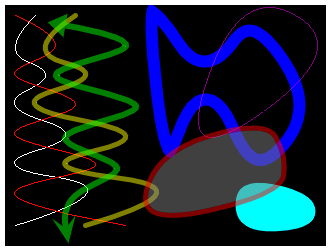
Drawing splines

test_splines

Method Description
drawQuadSpline() Draw a simple quadratic spline.
drawCubicSpline() Draw a simple cubic spline.
drawThickQuadSplineAA() Draw a thick quadratic spline, with anti-aliasing.
drawThickCubicSplineAA() Draw a thick cubic spline, with anti-aliasing.
drawThickClosedSplineAA() Draw a thick closed spline, with anti-aliasing.
drawClosedSpline() Draw a simple closed spline.
fillClosedSplineAA() Draw a closed spline and fill its interior, with anti-aliasing.
fillThickClosedSplineAA() Draw a thick closed spline and fill its interior, with anti-aliasing.

Code used to generate the image:

tgx::RGB32 buffer[320*240]; //
tgx::Image<tgx::RGB32> im(buffer, 320, 240); // create a black 320x240 image.
im.clear(tgx::RGB32_Black); //
const tgx::iVec2 tabPoints1[] = { {30, 10}, {10, 40}, {40, 70}, {10, 100}, {60, 130}, {10, 160}, {80, 190}, {10, 220} };
im.drawQuadSpline(8, tabPoints1, true, tgx::RGB32_White); // simple quadratic spline
const tgx::iVec2 tabPoints2[] = { {10, 10}, {50, 40}, {10, 70}, {70, 100}, {10, 130}, {90, 160}, {10, 190}, {120, 220} };
im.drawCubicSpline(8, tabPoints2, true, tgx::RGB32_Red); // simple cubic spline
const tgx::fVec2 tabPoints3[] = { {70, 10}, {40, 40}, {80, 70}, {30, 100}, {120, 130}, {60, 160}, {150, 190}, {80, 220} };
im.drawThickQuadSplineAA(8, tabPoints3, 5, tgx::END_ROUNDED, tgx::END_ROUNDED, tgx::RGB32_Yellow, 0.5f); // thick quadratic spline, 50% opacity, with AA
const tgx::fVec2 tabPoints4[] = { {60, 20}, {120, 40}, {50, 70}, {130, 100}, {60, 130}, {110, 160}, {70, 190}, {60, 220} };
im.drawThickCubicSplineAA(8, tabPoints4, 6, tgx::END_ARROW_3, tgx::END_ARROW_SKEWED_3, tgx::RGB32_Green, 0.5f); // thick cubic spline, 50% opacity, with AA
const tgx::fVec2 tabPoints5[] = { {140, 20}, {160, 10}, {200, 50}, {250, 20}, {300, 100}, {250, 160}, {200, 100}, {160, 150} };
im.drawThickClosedSplineAA(8, tabPoints5, 12, tgx::RGB32_Blue); // thick closed spline, with AA
const tgx::iVec2 tabPoints6[] = { {240, 10}, {310, 50}, {200, 130} };
im.drawClosedSpline(3, tabPoints6, tgx::RGB32_Magenta, 0.5f); // simple closed spline, 50% opacity
const tgx::fVec2 tabPoints7[] = { {300, 220}, {240, 220}, {240, 180}, {300, 190} };
im.fillClosedSplineAA(4, tabPoints7, tgx::RGB32_Cyan); // interior filled closed spline, with AA
const tgx::fVec2 tabPoints8[] = { {150, 210}, {160, 150}, {250, 120}, {280, 150}, {260, 190} };
im.fillThickClosedSplineAA(5, tabPoints8, 5, tgx::RGB32_Gray ,tgx::RGB32_Red, 0.5f); // interior filled thick closed spline, 50% opacity, with AA

Drawing text

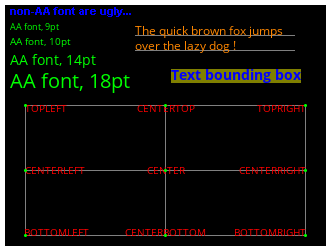
test_text

Method Description
drawText() Draw text using a given font. Simple "legacy" method.
drawTextEx() Draw text using a given font. Extended method with anchor placement (see tgx::Anchor).
drawChar() Draw a single character and return the next cursor position.
measureText() Compute the bounding box of a text string without drawing it.
measureChar() Compute the bounding box of a character without drawing it.

TGX can draw bitmap fonts directly from the font headers included with the project. The simple drawText() method places text at the default text anchor, which is baseline-left. Use drawTextEx() when the text must be centered, aligned to a box, placed relative to another anchor point, or measured consistently before drawing.

Concept Meaning
Baseline The default text position is on the text baseline, not on the top-left corner of the text box.
Anchor drawTextEx() interprets the position according to the selected tgx::Anchor.
Measurement measureText() and measureChar() return bounding boxes without drawing anything.
Built-in fonts TGX ships bitmap font headers that must be explicitly included when used.
Converted fonts The recommended way to create new TGX font headers is the bundled `tools/tgx_font.py` converter.
TrueType fonts For TrueType rendering, use the optional OpenFontRender binding described in Drawing text with TrueType fonts.

additional includes for the text fonts

#include "font_tgx_Arial.h"
Arial font for multiple for size ranging from 8pt to 96pt.
OpenSans font for multiple for size ranging from 8pt to 36pt.

Code used to generate the image:

tgx::RGB32 buffer[320*240]; //
tgx::Image<tgx::RGB32> im(buffer, 320, 240); // create a black 320x240 image.
im.clear(tgx::RGB32_Black); //
// drawing text: the anchor point uses the baseline.
im.drawText("non-AA fonts are ugly...", { 5, 10 }, font_tgx_Arial_8, tgx::RGB32_Blue); // a non-AA font
im.drawText("AA font, 9pt", { 5, 25 }, font_tgx_OpenSans_9, tgx::RGB32_Green); // AA font, 9pt
im.drawText("AA font, 10pt", { 5, 40 }, font_tgx_OpenSans_10, tgx::RGB32_Green); // AA font, 10pt
im.drawText("AA font, 14pt", { 5, 60 }, font_tgx_OpenSans_14, tgx::RGB32_Green); // AA font, 14pt
im.drawText("AA font, 20pt", { 5, 83 }, font_tgx_OpenSans_20, tgx::RGB32_Green); // AA font, 20pt
// drawing on the baseline
im.drawFastHLine({ 130, 30 }, 160, tgx::RGB32_White, 0.5f);
im.drawFastHLine({ 130, 45 }, 160, tgx::RGB32_White, 0.5f);
im.drawText("The quick brown fox jumps", { 130, 30 }, font_tgx_OpenSans_12, tgx::RGB32_Orange);
im.drawText("over the lazy dog !", { 130, 45 }, font_tgx_OpenSans_12, tgx::RGB32_Orange);
// finding the bounding box of text.
const char * tbb = "Text bounding box";
tgx::iBox2 bb = im.measureText(tbb, { 230, 70 }, font_tgx_OpenSans_14, tgx::Anchor::CENTER, false, false);
im.fillRect(bb, tgx::RGB32_Yellow, 0.5f);
im.drawTextEx(tbb, { 230, 70 }, font_tgx_OpenSans_14, tgx::Anchor::CENTER, false, false, tgx::RGB32_Blue);
// draw text with different anchor points using drawTextEx()
// -> the anchor is relative to the text bounding box
im.drawRect({ 20, 300,100, 230 }, tgx::RGB32_Gray);
im.drawFastHLine({ 20, 165 }, 280, tgx::RGB32_Gray);
im.drawFastVLine({ 160, 100 }, 130, tgx::RGB32_Gray);
tgx::iVec2 anchor_point;
anchor_point = {20, 100 };
im.drawTextEx("TOPLEFT", anchor_point, font_tgx_OpenSans_10, tgx::Anchor::TOPLEFT, true, true, tgx::RGB32_Red);
im.fillCircleAA(anchor_point,1.5, tgx::RGB32_Green);
anchor_point = { 300, 100 };
im.drawTextEx("TOPRIGHT", anchor_point, font_tgx_OpenSans_10, tgx::Anchor::TOPRIGHT, true, true, tgx::RGB32_Red);
im.fillCircleAA(anchor_point, 1.5, tgx::RGB32_Green);
anchor_point = { 20, 230 };
im.drawTextEx("BOTTOMLEFT", anchor_point, font_tgx_OpenSans_10, tgx::Anchor::BOTTOMLEFT, true, true, tgx::RGB32_Red);
im.fillCircleAA(anchor_point, 1.5, tgx::RGB32_Green);
anchor_point = { 300, 230 };
im.drawTextEx("BOTTOMRIGHT", anchor_point, font_tgx_OpenSans_10, tgx::Anchor::BOTTOMRIGHT, true, true, tgx::RGB32_Red);
im.fillCircleAA(anchor_point, 1.5, tgx::RGB32_Green);
anchor_point = { 160, 100 };
im.drawTextEx("CENTERTOP", anchor_point, font_tgx_OpenSans_10, tgx::Anchor::CENTERTOP, true, true, tgx::RGB32_Red);
im.fillCircleAA(anchor_point, 1.5, tgx::RGB32_Green);
anchor_point = { 160, 230 };
im.drawTextEx("CENTERBOTTOM", anchor_point, font_tgx_OpenSans_10, tgx::Anchor::CENTERBOTTOM, true, true, tgx::RGB32_Red);
im.fillCircleAA(anchor_point, 1.5, tgx::RGB32_Green);
anchor_point = { 20, 165 };
im.drawTextEx("CENTERLEFT", anchor_point, font_tgx_OpenSans_10, tgx::Anchor::CENTERLEFT, true, true, tgx::RGB32_Red);
im.fillCircleAA(anchor_point, 1.5, tgx::RGB32_Green);
anchor_point = { 300, 165 };
im.drawTextEx("CENTERRIGHT", anchor_point, font_tgx_OpenSans_10, tgx::Anchor::CENTERRIGHT, true, true, tgx::RGB32_Red);
im.fillCircleAA(anchor_point, 1.5, tgx::RGB32_Green);
anchor_point = { 160, 165 };
im.drawTextEx("CENTER", anchor_point, font_tgx_OpenSans_10, tgx::Anchor::CENTER, true, true, tgx::RGB32_Red);
im.fillCircleAA(anchor_point, 1.5, tgx::RGB32_Green);
const ILI9341_t3_font_t font_tgx_Arial_8
Arial font 8pt.
const ILI9341_t3_font_t font_tgx_OpenSans_14
OpenSans font 14pt.
const ILI9341_t3_font_t font_tgx_OpenSans_9
OpenSans font 9pt.
const ILI9341_t3_font_t font_tgx_OpenSans_10
OpenSans font 10pt.
const ILI9341_t3_font_t font_tgx_OpenSans_20
OpenSans font 20pt.
const ILI9341_t3_font_t font_tgx_OpenSans_12
OpenSans font 12pt.
Generic 2D Box [specializations iBox2 , fBox2, dBox2].
Definition: Box2.h:151

The TGX library supports fonts using:

Note
For new projects, prefer the bundled `tools/tgx_font.py` converter. It creates Adafruit GFX, ILI9341_t3 v1 and ILI9341_t3 v2.3 font headers from TrueType/OpenType fonts, with graphical and command-line interfaces. The older tgx-font repository (https://github.com/vindar/tgx-font) is still useful as a ready-made collection of ILI9341_t3 v1 and v2 antialiased fonts.

The following fonts are already packaged with TGX but must be included explicitly in the project when used:

  • Arial (non-AA font): #include "font_tgx_Arial.h"
  • Arial Bold (non-AA font): #include "font_tgx_Arial_Bold.h"
  • OpenSans (AA font): #include "font_tgx_OpenSans.h"
  • OpenSans Bold (AA font): #include "font_tgx_OpenSans_Bold.h"
  • OpenSans Italic (AA font): #include "font_tgx_OpenSans_Italic.h"

Each font above is available in the following sizes: 8pt, 9pt, 10pt, 11pt, 12pt, 13pt, 14pt, 16pt, 18pt, 20pt, 24pt, 28pt, 32pt, 40pt, 48pt, 60pt, 72pt, 96pt.


TGX extensions via external libraries

TGX can cooperate with a few external Arduino libraries to add image decoding and TrueType font rendering to the Image class. These bindings are optional: if the external library is not installed or not included by the sketch, TGX still works normally and no extra dependency is required.

Extension External library Purpose
Drawing text with TrueType fonts OpenFontRender Draw TrueType fonts into a TGX image.
Drawing PNG images PNGdec Decode PNG images into a TGX image.
Drawing JPEG images JPEGDEC Decode JPEG images into a TGX image.
Drawing GIF images AnimatedGIF Decode and display GIF frames into a TGX image.

Drawing text with TrueType fonts

Install Takkao's OpenFontRender library from https://github.com/takkaO/OpenFontRender/.

Include both libraries in the sketch to activate the TGX/OpenFontRender binding:

#include <tgx.h>
#include <OpenFontRender.h>
Main header file.

Then bind an OpenFontRender object to an image with Image::setOpenFontRender(ofr). After that, OpenFontRender can be used normally: text drawn with ofr is rendered into the selected TGX image.

Example:

// create a 100x50 image in RGB565 color format.
tgx::RGB565 buf[100*50];
tgx::Image<tgx::RGB565> im(buf, 100, 50);
im.clear(tgx::RGB565_Black); // clear to full black
// create a font rendering object
OpenFontRender ofr;
// we link it with image im
im.setOpenFontRender(ofr);
// set up the font rendering object properties before drawing
ofr.loadFont(NotoSans_Bold, sizeof(NotoSans_Bold)); // assume here that NotoSans_Bold is a TrueType font in memory.
ofr.setFontColor((uint16_t)tgx::RGB565_Yellow, (uint16_t)tgx::RGB565_Black); // set foreground and background colors for drawing text
ofr.setCursor(10, 20); // Set the cursor position
ofr.setFontSize(15); // set font size.
// and let's draw text !
ofr.cprintf("Hello World"); // -> drawing is done onto im.
Color in R5/G6/B5 format.
Definition: Color.h:216
Note
A complete example is available in the subfolder /examples/Teensy4/2D/OpenFontRender_test/.

Check the OpenFontRender documentation for additional details.

Drawing PNG images

Install Bitbank2's PNGdec library from the Arduino library manager / PlatformIO or directly from https://github.com/bitbank2/PNGdec/.

Include both libraries in the sketch to activate the TGX/PNGdec binding:

#include <tgx.h>
#include <PNGdec.h>

Open the PNG with the TGX_PNGDraw callback, then decode it into an image with Image::PNGDecode().

Example:

// create a 150x100 image in RGB565 color format.
tgx::RGB565 buf[150*100];
tgx::Image<tgx::RGB565> im(buf, 150, 100);
im.clear(tgx::RGB565_Black); // clear to full black
// PNG decoder object from PNGdec library
PNG png;
// Load the PNG image "octocat_4bpp" stored in RAM and link the decoder to TGX
// -> note that 'TGX_PNGDraw' is passed as callback parameter.
png.openRAM((uint8_t*)octocat_4bpp, sizeof(octocat_4bpp), TGX_PNGDraw);
// Draw the PNG onto im, with half opacity and upper-left corner at pos (20, 10) inside im.
im.PNGDecode(png, {20, 10}, 0.5f);
Note
A complete example is available in the subfolder /examples/Teensy4/2D/PNG_test/.

Check the PNGdec documentation for additional details.

Drawing JPEG images

Install Bitbank2's JPEGDEC library from the Arduino library manager / PlatformIO or directly from https://github.com/bitbank2/JPEGDEC.

Include both libraries in the sketch to activate the TGX/JPEGDEC binding:

#include <tgx.h>
#include <JPEGDEC.h>

Open the JPEG with the TGX_JPEGDraw callback, then decode it into an image with Image::JPEGDecode().

Example:

// create a 150x100 image in RGB565 color format.
tgx::RGB565 buf[150*100];
tgx::Image<tgx::RGB565> im(buf, 150, 100);
im.clear(tgx::RGB565_Black); // clear to full black
// JPEG decoder object from JPEGDEC library
JPEGDEC jpeg;
// Load the JPEG image "batman" stored in RAM and link the decoder to TGX
// -> note that 'TGX_JPEGDraw' is passed as callback parameter.
jpeg.openRAM((uint8_t*)batman, sizeof(batman), TGX_JPEGDraw);
// Draw the JPEG onto im at half scale, half opacity and upper-left corner at pos (20, 10) inside im.
im.JPEGDecode(jpeg, {20, 10}, JPEG_SCALE_HALF, 0.5f);
Note
A complete example is available in the subfolder /examples/Teensy4/2D/JPEG_test/.

Check the JPEGDEC documentation for additional details.

Drawing GIF images

Install Bitbank2's AnimatedGIF library from the Arduino library manager / PlatformIO or directly from https://github.com/bitbank2/AnimatedGIF.

Include both libraries in the sketch to activate the TGX/AnimatedGIF binding:

#include <tgx.h>
#include <AnimatedGIF.h>

Open the GIF with the TGX_GIFDraw callback, then draw frames into an image with Image::GIFplayFrame().

This method wraps the playFrame() method from the AnimatedGIF library and can be called repeatedly to display successive frames.

Example:

// create a 150x100 image in RGB565 color format.
tgx::RGB565 buf[150*100];
tgx::Image<tgx::RGB565> im(buf, 150, 100);
im.clear(tgx::RGB565_Black); // clear to full black
// GIF decoder object from AnimatedGIF library
AnimatedGIF gif;
// Load the GIF image "earth_128x128" stored in RAM and link the decoder to TGX
// -> note that 'TGX_GIFDraw' is passed as callback parameter.
gif.open((uint8_t*)earth_128x128, sizeof(earth_128x128), TGX_GIFDraw);
// Draw the GIF onto im with upper-left corner at pos (20, 10) inside im.
im.GIFplayFrame(gif, { 20, 10 });
// we can call im.GIFplayFrame(gif, { 20, 10 }) again to draw the next frame if it is an animation...
Note
A complete example is available in the subfolder /examples/Teensy4/2D/GIF_test/.

Check the AnimatedGIF documentation for additional details.

Where to go next

This page covered the main 2D drawing methods available on tgx::Image. The examples above are intentionally small; complete sketches are available in /examples.

For the memory model, color types, image views and coordinate conventions, see Basic concepts. For 3D rendering, meshes, shaders and projection matrices, continue with the 3D API introduction.